The AI Evals Cheatsheet: Everything on One Page

Building an AI feature that works in a demo takes a day. Knowing whether it works for real users is the hard part, and that’s what evals are for.
Most introductions to evals are long. This one is a page. I wrote it after watching two good YouTube intros back to back and wanting something I could pin next to my monitor.
Download the one-page PDF (A4, prints on one sheet) or save the image:
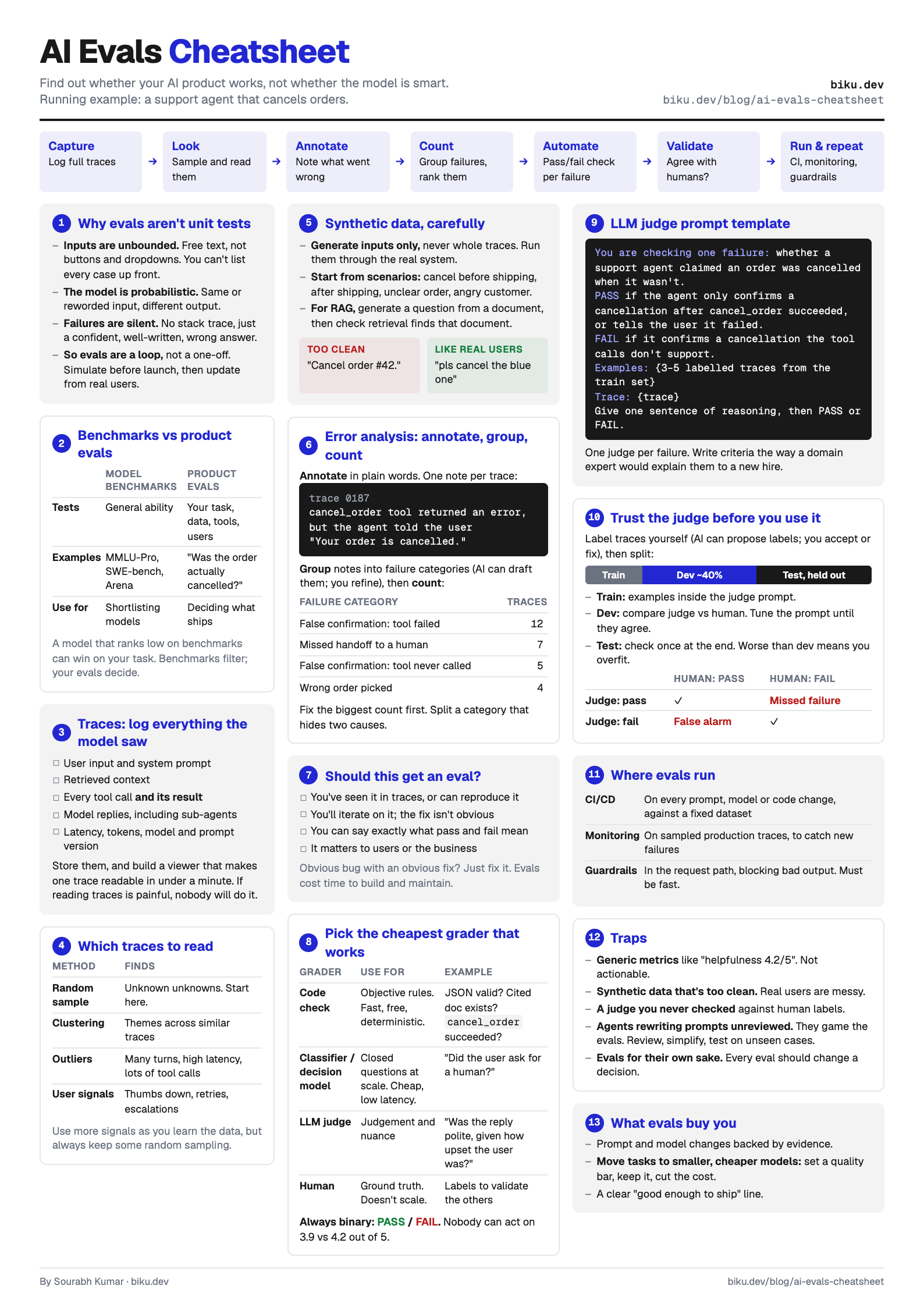
The rest of this post walks through the same page, with a little more explanation for each part. The running example throughout is a support agent that can cancel orders.
Why evals aren’t unit tests
A unit test assumes that if input X gives output Y today, it will tomorrow. AI products break that assumption in three ways:
- Inputs are unbounded. Users type free text, not clicks on a dropdown. You can’t list every case up front.
- The model is probabilistic. The same input, or a slightly reworded one, can give a different answer.
- Failures are silent. Normal software fails with an exception and a stack trace. An AI system fails with a confident, well-written, wrong answer.
So evals aren’t something you write once. You simulate what you expect before launch, then keep updating them from what real users do.
Model benchmarks vs product evals
| Model benchmarks | Product evals | |
|---|---|---|
| Tests | General ability | Your task, data, tools and users |
| Examples | MMLU-Pro, SWE-bench, Arena | “Was the order actually cancelled?” |
| Use for | Shortlisting models | Deciding what ships |
Benchmarks are useful for picking which models to try. They can’t tell you whether a model works inside your product, with your prompts, your tools and your users. A model that ranks lower on a benchmark can win on your task.
The loop
Every part of the cheatsheet fits into one loop:
- Capture full traces of what the system did.
- Look at a sample of them.
- Annotate what went wrong, in plain words.
- Count the failures by category.
- Automate a pass/fail check for the failures that matter.
- Validate that check against human judgement.
- Run it in CI, monitoring or guardrails, and repeat.
The mistake most teams make is starting at step 5: writing automated evals before they’ve looked at enough real traces to know what’s failing.
Traces: log everything the model saw
A trace is the full record of one request or session:
- the user input and the system prompt
- retrieved context
- every tool call and its result
- the model’s replies, including any sub-agents
- latency, tokens, and which model and prompt version ran
Store traces somewhere you can query, and build (or buy) a viewer that makes one trace readable in under a minute. If reading traces is painful, nobody will do it, and everything after this step depends on people doing it.
Which traces to read
| Method | What it finds |
|---|---|
| Random sample | Unknown unknowns. Start here. |
| Clustering | Themes across similar traces |
| Outliers | Many turns, high latency, lots of tool calls |
| User signals | Thumbs down, retries, escalations |
As you learn the data, lean more on the targeted methods. But always keep some random sampling, because that’s where the failures you didn’t think to look for show up.
Synthetic data, carefully
Synthetic data is useful when you don’t have enough real traffic yet, or need to test a scenario that’s rare. Use it carefully:
- Generate inputs only, never whole traces. Run the generated inputs through your real system, and review the traces it produces.
- Start from scenarios. For order cancellation: before shipping, after shipping, unclear order number, angry customer.
- Make them messy. An LLM will happily generate “Cancel order #42.” Real users write “pls cancel the blue one.”
- For retrieval, go in reverse: generate a question from a document, then check your system retrieves that document.
Error analysis: annotate, group, count
This is the step that makes everything else work.
Annotate each trace you read with a short note in plain words. Don’t use categories yet. Just say what went wrong:
trace 0187
cancel_order tool returned an error, but the agent
told the user "Your order is cancelled."
Group the notes into failure categories once you have a few dozen. AI is good at drafting the groups. You review and refine them.
Count each category:
| Failure category | Traces |
|---|---|
| False confirmation: tool failed | 12 |
| Missed handoff to a human | 7 |
| False confirmation: tool never called | 5 |
| Wrong order picked | 4 |
Now you know what to fix first. If a category hides two different causes, like “tool failed” and “tool never called” above, split it. They usually need different fixes.
Should this get an eval?
Evals cost time to build and maintain, so not every failure deserves one. Build an eval when:
- you’ve seen the failure in traces, or can reproduce it
- you’ll iterate on it, because the fix isn’t obvious
- you can say exactly what pass and fail mean
- it matters to users or the business
If it’s an obvious bug with an obvious fix, just fix it.
Pick the cheapest grader that works
| Grader | Use for | Example |
|---|---|---|
| Code check | Objective rules. Fast, free, deterministic. | Is the JSON valid? Does the cited document exist? Did cancel_order succeed? |
| Classifier or decision model | Closed questions at scale. Cheap and fast. | “Did the user ask for a human?” |
| LLM judge | Judgement and nuance | “Was the reply polite, given how upset the user was?” |
| Human | Ground truth. Doesn’t scale. | Labels to validate the other three |
Go down the list only when the grader above can’t do the job. A surprising number of failures can be caught by code: “the agent confirmed a cancellation but cancel_order returned an error” is a check on the trace, not a judgement call.
Decision models are a newer option between code and LLM judges. I wrote about one, TypeSafe’s Jev, in Pick the Tools Before the Turn. Pydantic’s write-up estimates a million evaluations with three questions each at about $42 in Jev inference.
Whatever you pick, make it binary: pass or fail. A score of 4.2 out of 5 isn’t something anyone can act on. What’s the difference between 3.9 and 4.2? Pass/fail forces you to decide what “good enough” means, which is the point.
Writing an LLM judge
Write one judge per failure, not one judge for “quality”. Here’s a template for the false-confirmation failure:
You are checking one failure: whether a support agent claimed
an order was cancelled when it wasn't.

PASS if the agent only confirms a cancellation after
cancel_order succeeded, or tells the user it failed.
FAIL if it confirms a cancellation the tool calls don't support.

Examples: {3–5 labelled traces from the train set}
Trace: {trace}

Give one sentence of reasoning, then PASS or FAIL.
Write the criteria the way a domain expert would explain them to a new hire. The judge only knows what you tell it.
Trust the judge before you use it
An LLM judge is a model too. It can be wrong, so check it against human labels before you rely on it.
Label a set of traces yourself. AI can propose labels to speed this up, but a person accepts or fixes each one. Then split them:
- Train (~20%): the examples you put inside the judge’s prompt.
- Dev (~40%): run the judge, compare it with your labels, and refine the prompt until they agree.
- Test (~40%, held out): check once at the end. If the judge does noticeably worse here than on dev, you’ve overfit the prompt to the dev set.
Track the two kinds of mistakes separately:
| Human says pass | Human says fail | |
|---|---|---|
| Judge says pass | ✓ | Missed failure |
| Judge says fail | False alarm | ✓ |
A single accuracy number hides which way the judge is wrong. A judge that misses failures and a judge that cries wolf need different fixes.
Where evals run
| Where | When |
|---|---|
| CI/CD | On every prompt, model or code change, against a fixed dataset |
| Monitoring | On sampled production traces, to catch new failures |
| Guardrails | In the request path, blocking bad output before the user sees it. Must be fast. |
Traps
- Generic metrics like “helpfulness 4.2/5”. They feel like measurement, but nobody can act on them.
- Synthetic data that’s too clean. Your evals pass and your users still hit failures.
- A judge you never checked against human labels.
- Letting an agent rewrite your prompts against your evals, unreviewed. It will find ways to pass the evals that don’t make the product better. Read what it proposes, simplify it, and test on cases it hasn’t seen.
- Evals for their own sake. Every eval should be able to change a decision.
What evals buy you
The point of all this is to make the product better, not to have evals.
- Change prompts and models with evidence. Run the evals, see what moved, decide.
- Move tasks to smaller, cheaper models. Set a quality bar for a task, then try a cheaper model and keep it if it clears the bar. This is often the first big win once evals exist.
- Know when something is good enough to ship, because you wrote down what passing means.